How it works
With triauth, your domain vouches for you. You publish your public keys as DNS records under a domain you control. A browser on your device keeps the matching private keys. When a website asks you to sign in, your browser signs the request, and the website verifies the signature against your DNS records. There is no password, and no account at an identity provider.
The three parts
Your identifier
An identifier looks like an email address, for example john@example.com. You can use your email address, or any name at a domain that you or your organization controls. The part after @ tells websites where to look for your records.
Your DNS records
The TXT records are the public half of your identity. Your domain publishes one record that says what the address of your authenticator is, and, for each registered identifier, identity records with device names, their public keys, and other information. Anyone can read them.
Your authenticator
The authenticator is a small web application that runs in your browser. It creates your keys, stores the private key on your device, and shows you requests for approval. The triauth project runs one at auth.triauth.org. You can also host your own.
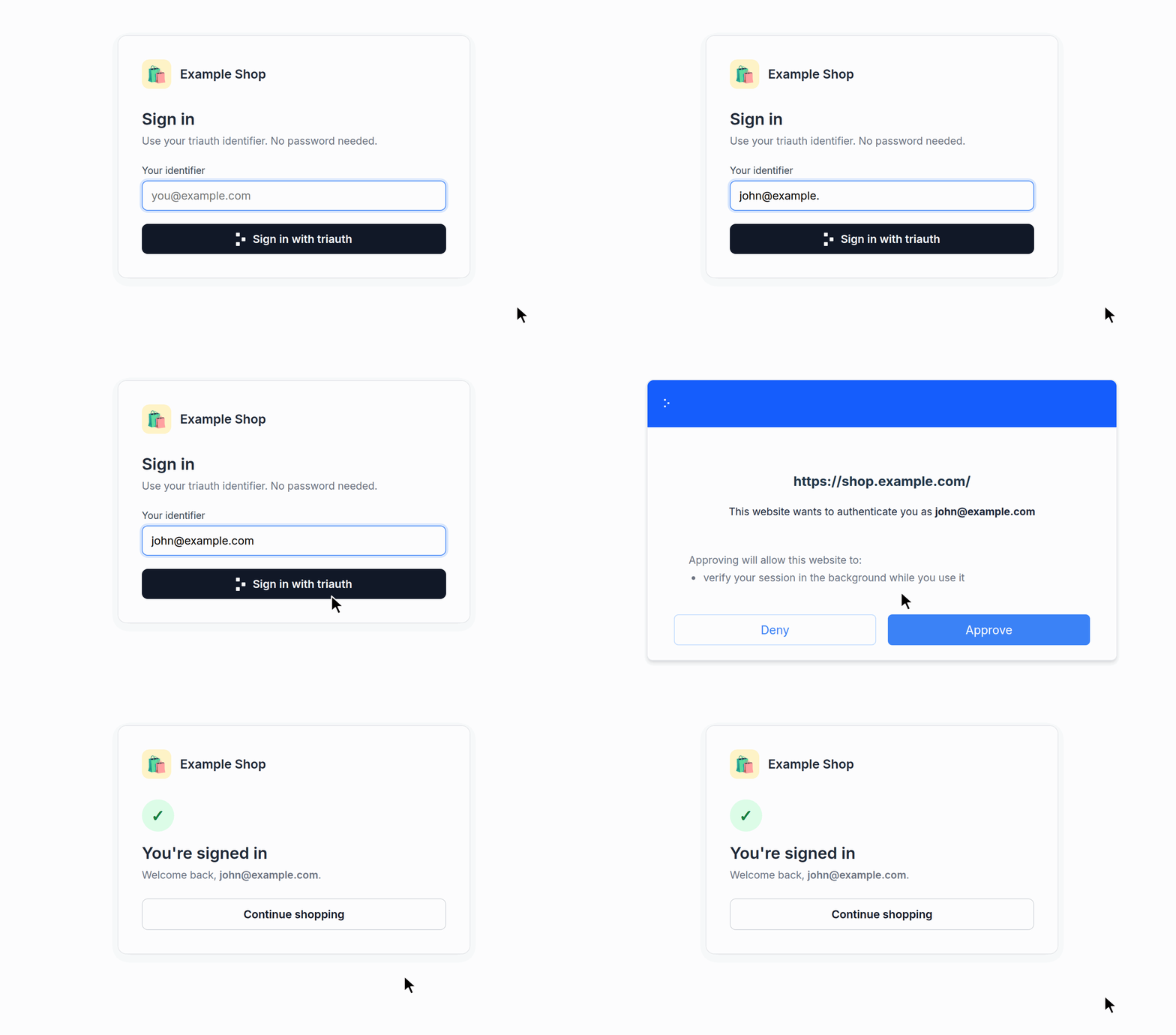
A sign-in, step by step
- You type your identifier on the website.
- The website reads your domain's record in DNS. It finds the address of your authenticator, for example
auth.triauth.org. - The website builds a sign-in request and redirects your browser to the address of your authenticator with it.
- Your browser opens the authenticator at that address, like any other web page. The authenticator shows you which website asks, and as whom. You approve or deny.
- On approval, your device signs the request with its private key. Your browser returns the signed response to the website.
- The website reads your identity records from DNS. They contain your public keys.
- The website verifies the signed response with your public keys. You are signed in.
A response is tied to the website that asked, so a response for one website is useless on another.
What the website learns
After a successful sign-in, the website knows:
- your identifier, verified
- which of your devices signed, by the public name you gave it
- whether your DNS records were protected by DNSSEC
- your public profile, if you published one
- your private profile, if you decided to share it with the website
- the groups your domain publishes for you, if any
- other triauth-protocol-related information
The website never receives your private keys, because they never leave your device. There is no password to leak, reuse, or phish.
See the records yourself
The demo identifier john@triauthdemo.org runs in public mode, so its records are easy to find. Look them up with any DNS tool, for example dig on macOS and Linux, or nslookup -type=TXT on Windows:
shell
dig +short TXT triauthdemo.org
dig +short TXT john._at.triauthdemo.org
The first answer names the authenticator for everyone at triauthdemo.org. The second lists John's public profile, devices, and keys:
"triauth auth.triauthdemo.org mode=public"

"name John Doe"
"initials JD"
"key laptop[1/2]:BFj4O8oJN4mr-IXtikZpDqTarqn_ZMuKbpdqxqKxwV9szveo…"
"key laptop[2/2]:BLstmtxB6ceFUwjORLMlWfFmZ9XtqMQeUGs5iaCXkCQVUh-l…"
"key desktop[1/1]:BJSnllMPgReHvUqe7CYElsmTx8hLdYWVyneqif1DP58WlhIt…"
John has two devices. His laptop has two keys, and both sign each request. Delete the laptop records, and that laptop can no longer sign in anywhere.
By default, a domain runs in private mode, and the identifier itself does not appear in DNS. See Public and private mode.
More than sign-in
Triauth can do more than open a session. A website can ask your authenticator to:
- confirm in the background that you still hold your keys, so that a stolen session stops working
- show you a document for approval, for example to accept terms
- prove to another website that you are signed in
- collect a confirmation about you from a third party, such as "over 18", without revealing more than needed
Next steps
- Set up your identity in about ten minutes.
- Why triauth compares this design with the alternatives.