triauth for KeycloakOIDC
Let your team sign in to Keycloak, and to every app behind it, with one approval on their own device.
- Sign-in through
- OpenID Connect bridge
- Available in
- Every Keycloak installation
- Set up in
- Admin console › Identity providers
About Keycloak
Keycloak is an identity server that companies run themselves. It holds user accounts, signs people into applications over OpenID Connect and SAML, and can hand the actual login to another identity provider. Teams put it in front of dozens of internal apps, so each app only knows Keycloak.
Connect Keycloak to triauth
Keycloak signs people in through the triauth OpenID Connect bridge, as an identity provider of a realm. Once connected, Keycloak's login page shows a button with your domain's name. People on your team click it, type their username, and approve on their own device, and Keycloak signs them into every app behind it. One connection covers them all, and when someone leaves, removing their identity records at your domain ends their access to every one of them.
How it works
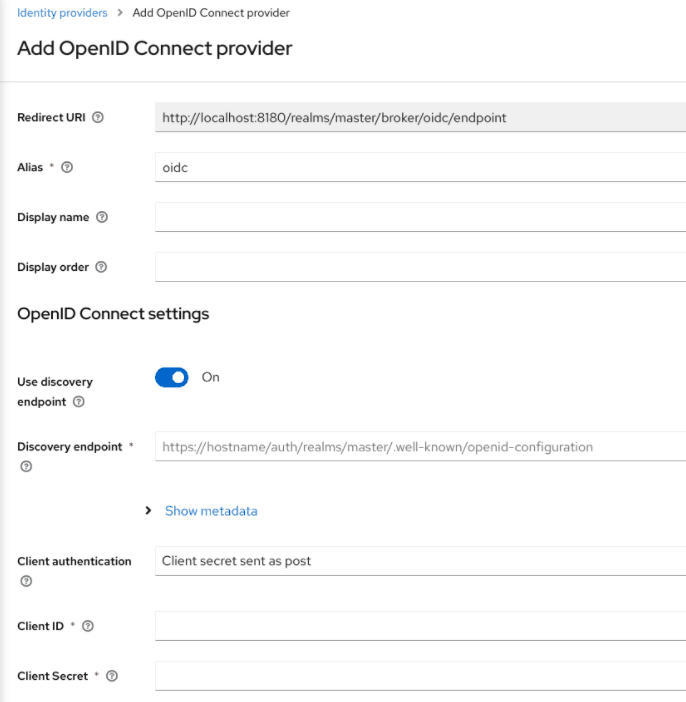
In the admin console, choose the realm, open Identity providers, and pick OpenID Connect v1.0 from Add provider. Enter the alias
triauthand the display nameexample.com, and copy the Redirect URI the form shows,https://keycloak.example.com/realms/<realm>/broker/triauth/endpointwith your own address.Open oidc.triauth.org and enter your domain. Paste the redirect URI and click Connect app. The bridge gives you a client ID and a client secret.
Back in the form, fill in the fields below with your domain in place of
example.com, and add the provider. Then, on its Settings tab, set Scopes toopenid email profile groups, turn Trust Email on, and save.Field Value Use discovery endpoint on, with https://oidc.triauth.org/example.com/.well-known/openid-configurationClient authentication Client secret sent as HTTP Basic authentication Client ID and Client Secret from the bridge Use PKCE on, with the method S256 Open the realm's login page and click
example.com.
Checkpoint
Keycloak's login page shows a button labelled example.com. Choosing it opens a page from the bridge that asks for the username, and the person's authenticator asks them to approve.
Good to know
- Everyone with an identity at your domain gets a Keycloak account the first time they sign in, through the realm's first broker login flow. To let only one team in, limit the app to a group when you connect it. The flow's Review Profile step may ask for a first and last name, since the bridge sends one full name. Make those fields optional in the realm's user profile, or turn the step off.
- The groups published at your domain reach Keycloak through mappers: one Advanced Claim to Group mapper per group, with the claim
groups, its value the group's full name such asadmins@example.com, and the sync mode Force. - Apps can skip Keycloak's login page with
kc_idp_hint=triauth, and Hide on login page keeps the button out of sight for everyone else.
For the person who connects the app
| Setting | Value |
|---|---|
| Redirect address | https://<your-keycloak>/realms/<realm>/broker/<alias>/endpoint, shown read-only on the form |
| Where in Keycloak | Admin console › the realm › Identity providers, then the provider's Settings and Mappers tabs |
| Discovery | the discovery endpoint fills the issuer and every address. The path in the issuer is fine |
| Client | HTTP Basic or request body, both accepted by the bridge, and PKCE S256 on |
| Leave off | Logout URL empty and Backchannel logout off, since the bridge has no sign-out endpoint. Store tokens off. Keycloak would keep the bridge's tokens only for applications that fetch them through its broker API, and its own sessions never depend on them. Accepts prompt=none forward from client off, since the bridge rejects it |
Keycloak's identity broker guide explains every field, the first login flow, and the mappers.
Next steps
- Read the OpenID Connect bridge page for what every connected app gets and what the bridge keeps private.
- Read Roll out to your team to give everyone in your organization an identifier at your domain.
- Read Groups to publish teams and map them to Keycloak groups.
- Read Keycloak's identity broker guide for every setting Keycloak offers.
All logos and trademarks belong to their respective owners and do not imply affiliation or endorsement of the organization or product by triauth, nor vice versa. The content provided on this page may include information from third-party sources. We do not assume any responsibility for the completeness, correctness, or applicability of the information. You should independently verify any details before relying on them.