triauth for JenkinsOIDC
Sign your team in to Jenkins with one approval on their own device, through the OpenID Connect Authentication plugin.
- Sign-in through
- OpenID Connect bridge
- Available in
- Every Jenkins, with the OpenID Connect Authentication plugin
- Set up in
- Manage Jenkins › Security
About Jenkins
Jenkins is the automation server that software teams use to build, test, and release their code every time someone makes a change. It runs on your own server, and hundreds of plugins connect it to the tools your team already uses.
Connect Jenkins to triauth
Jenkins signs people in through its OpenID Connect Authentication plugin, which you point at the triauth OpenID Connect bridge. From then on, clicking log in on Jenkins opens a page that asks for the person's username, and their own device asks them to approve. Nobody keeps a Jenkins password, and when someone leaves, removing their identity records at your domain ends their access to Jenkins as well.
How it works
- In Jenkins, install the OpenID Connect Authentication plugin under Manage Jenkins › Plugins.
- Open oidc.triauth.org and enter your domain. Paste Jenkins' redirect address,
https://jenkins.example.com/securityRealm/finishLoginwith your own Jenkins address in place ofjenkins.example.com, and click Connect app. - Under Manage Jenkins › Security, choose Login with Openid Connect as the security realm. Paste the client ID and the client secret, keep Discovery via well-known endpoint, and enter
https://oidc.triauth.org/example.com/.well-known/openid-configurationwith your domain in place ofexample.com. Save. - Sign out of Jenkins and click log in.
Checkpoint
Clicking log in on Jenkins opens a page from the bridge that asks for the username, and the person's authenticator asks them to approve. Jenkins then shows them signed in under their identifier.
Good to know
- Everyone with an identity at your domain can sign in and gets a Jenkins user at their first sign-in. What they may do comes from Jenkins' own authorization settings, where the groups published at your domain can be used by name.
- The plugin renews the sign-in through the bridge whenever its token expires, and applies the person's groups again each time. So a session follows the identity. When someone's records at your domain go away, the next renewal sends them back to the sign-in page.
- Scripts and the command line keep using Jenkins API tokens, as with every single sign-on provider.
- Before you switch, set up the plugin's escape hatch, a local admin login that works even when sign-in is unavailable.
For the person who connects the app
| Setting | Value |
|---|---|
| Redirect address | https://<your-jenkins>/securityRealm/finishLogin |
| Where in Jenkins | Manage Jenkins › Security › Security Realm › Login with Openid Connect |
| Discovery address | https://oidc.triauth.org/<your domain>/.well-known/openid-configuration |
| User fields | the username claim is sub by default, which the bridge fills with the identifier, and the groups claim is groups |
| Refresh | nothing to set in discovery mode. The plugin learns from the discovery document that the bridge renews sign-ins, and asks for every scope the bridge offers, offline_access included. If you fill in Override scopes, keep offline_access in the list. When the bridge cannot be reached at a renewal, Jenkins shows "Unable to refresh access token" and tries again on the next request |
| Escape hatch | Configure escape hatch for when the OpenID Provider is unavailable |
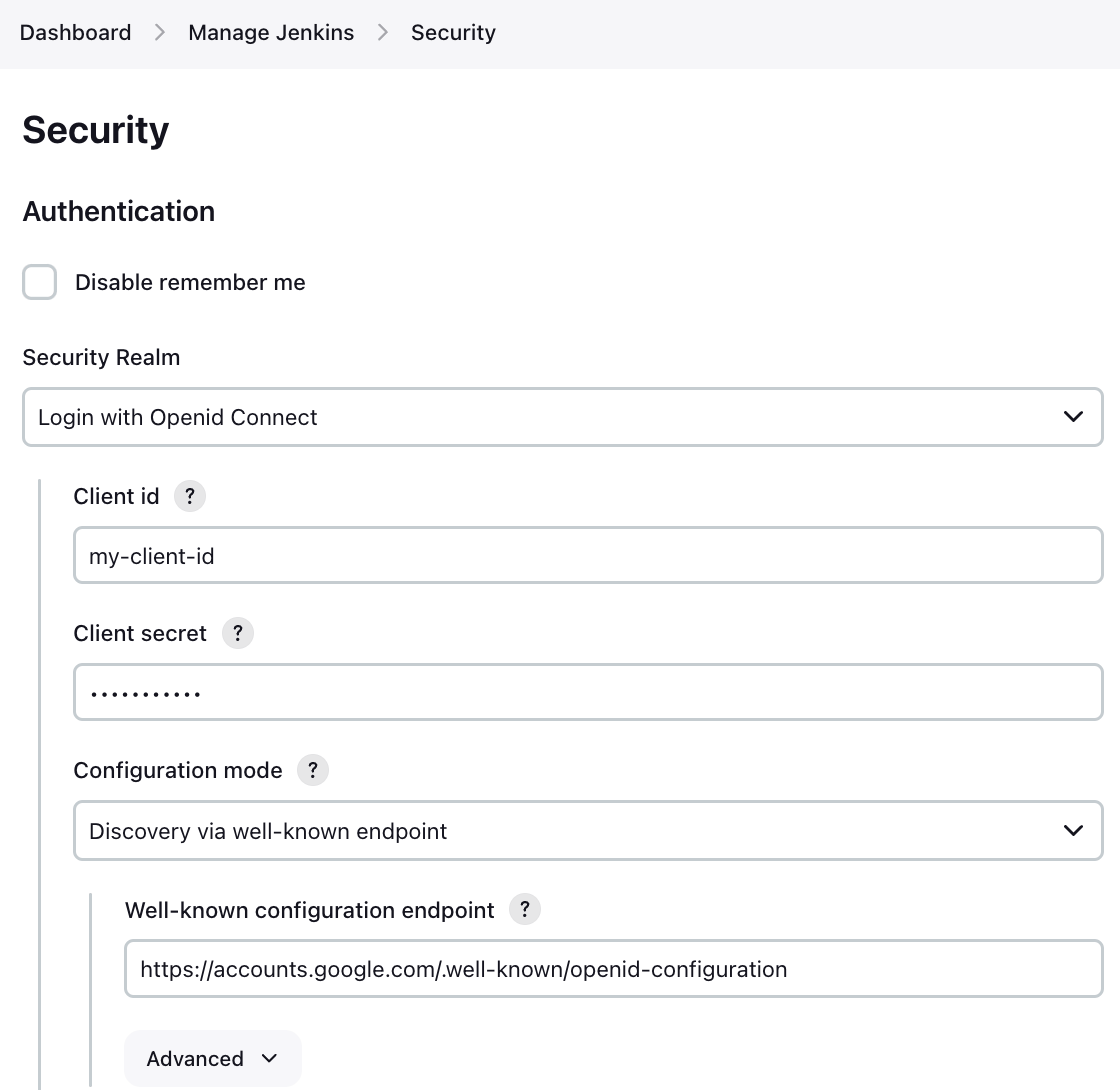
Jenkins keeps the client secret, so leave This app can't keep a secret unticked when you connect it on the bridge. The plugin's configuration reference explains every field, and its groups guide shows how groups turn into permissions.
Next steps
- Read the OpenID Connect bridge page for what every connected app gets and what the bridge keeps private.
- Read Roll out to your team to give everyone in your organization an identifier at your domain.
- Read Groups to publish teams and give Jenkins permissions by group.
- Read the plugin's configuration reference for every setting it offers.
All logos and trademarks belong to their respective owners and do not imply affiliation or endorsement of the organization or product by triauth, nor vice versa. The content provided on this page may include information from third-party sources. We do not assume any responsibility for the completeness, correctness, or applicability of the information. You should independently verify any details before relying on them.