triauth for AWXOIDC
Let your operations team open AWX with one approval on their own device, and no AWX passwords.
- Sign-in through
- OpenID Connect bridge
- Available in
- AWX 21.5 to 24.6
- Set up in
- Settings › Generic OIDC settings
About AWX
AWX is the web interface, API, and scheduler for running Ansible automation: job templates, inventories, credentials, schedules, and role-based access for teams. It is the free upstream of the automation controller in Red Hat Ansible Automation Platform.
Connect AWX to triauth
AWX signs people in through the triauth OpenID Connect bridge, with its Generic OIDC settings. Once connected, the login screen shows an OpenID Connect icon under the password form. People on your team click it, type their username, and approve on their own device. Nobody keeps an AWX password, and when someone leaves, removing their identity records at your domain ends their access to AWX as well.
How it works
Open oidc.triauth.org and enter your domain. Paste AWX's redirect address,
https://awx.example.com/sso/complete/oidc/with your own AWX address in place ofawx.example.com, and click Connect app. The bridge gives you a client ID and a client secret.In AWX, open Settings, choose Generic OIDC settings under Authentication, click Edit, and fill in the fields below with your domain in place of
example.com. Save.Field Value OIDC Key the client ID from the bridge OIDC Secret the client secret from the bridge OIDC Provider URL https://oidc.triauth.org/example.comVerify OIDC Provider Certificate on Log out and click the OpenID Connect icon under the login form.
Checkpoint
AWX's login screen shows the OpenID Connect icon under the username and password fields. Choosing it opens a page from the bridge that asks for the username, and the person's authenticator asks them to approve.
Good to know
- Everyone with an identity at your domain gets an AWX user the first time they sign in, named after their username, such as
john. To let only one team in, limit the app to a group when you connect it. - AWX puts nobody into organizations or teams through this sign-in, so administrators assign access after the first sign-in. The groups published at your domain are not used.
- AWX releases have been paused since July 2024 while the project is reworked, and its development branch hands sign-in to the Ansible Automation Platform gateway, which offers the same generic OpenID Connect sign-in with organization and team mapping.
For the person who connects the app
| Setting | Value |
|---|---|
| Redirect address | https://<your-awx>/sso/complete/oidc/, with the trailing slash |
| Where in AWX | Settings › Authentication › Generic OIDC settings |
| Provider URL | https://oidc.triauth.org/<your domain> without the well-known part, and the rest comes from the discovery document |
| Scopes | fixed to openid profile email |
AWX keeps the client secret, so leave This app can't keep a secret unticked when you connect it on the bridge.
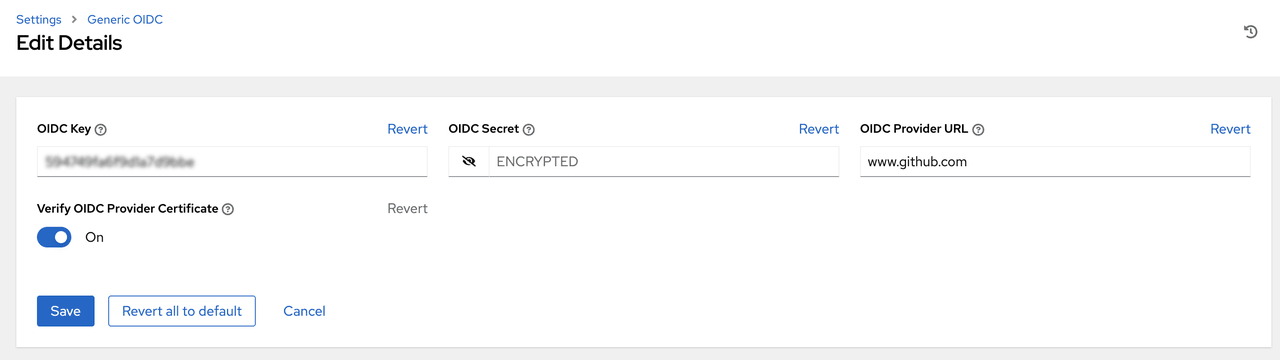
AWX's enterprise authentication guide describes the form, and the Ansible Automation Platform guide covers the gateway's version.
Next steps
- Read the OpenID Connect bridge page for what every connected app gets and what the bridge keeps private.
- Read Roll out to your team to give everyone in your organization an identifier at your domain.
- Read Groups to limit AWX to one team when you connect it.
- Read AWX's enterprise authentication guide for every setting AWX offers.
All logos and trademarks belong to their respective owners and do not imply affiliation or endorsement of the organization or product by triauth, nor vice versa. The content provided on this page may include information from third-party sources. We do not assume any responsibility for the completeness, correctness, or applicability of the information. You should independently verify any details before relying on them.